Implementing a new EHR system is one of the biggest bets a healthcare organization can make, and it doesn’t always pay off. According to KLAS Research’s Arch Collaborative, only 38% of organizations report that their recent EHR implementation fully met expectations. Workflow gaps, inadequate training, and data migration issues are common culprits, driving up costs, frustrating clinicians, and delaying patient care.
The global EHR market will cross $50 billion by 2033, showing just how much hospitals and clinics are willing to invest. But spending big doesn’t guarantee success.
This blog explains the 12 most common EHR implementation challenges clinics face, along with practical fixes for each. Whether you’re a clinic owner, operations head, healthcare provider, or IT lead planning a rollout or recovering from a failed one, this guide will help you navigate the process and avoid costly mistakes.
What is EHR Implementation?
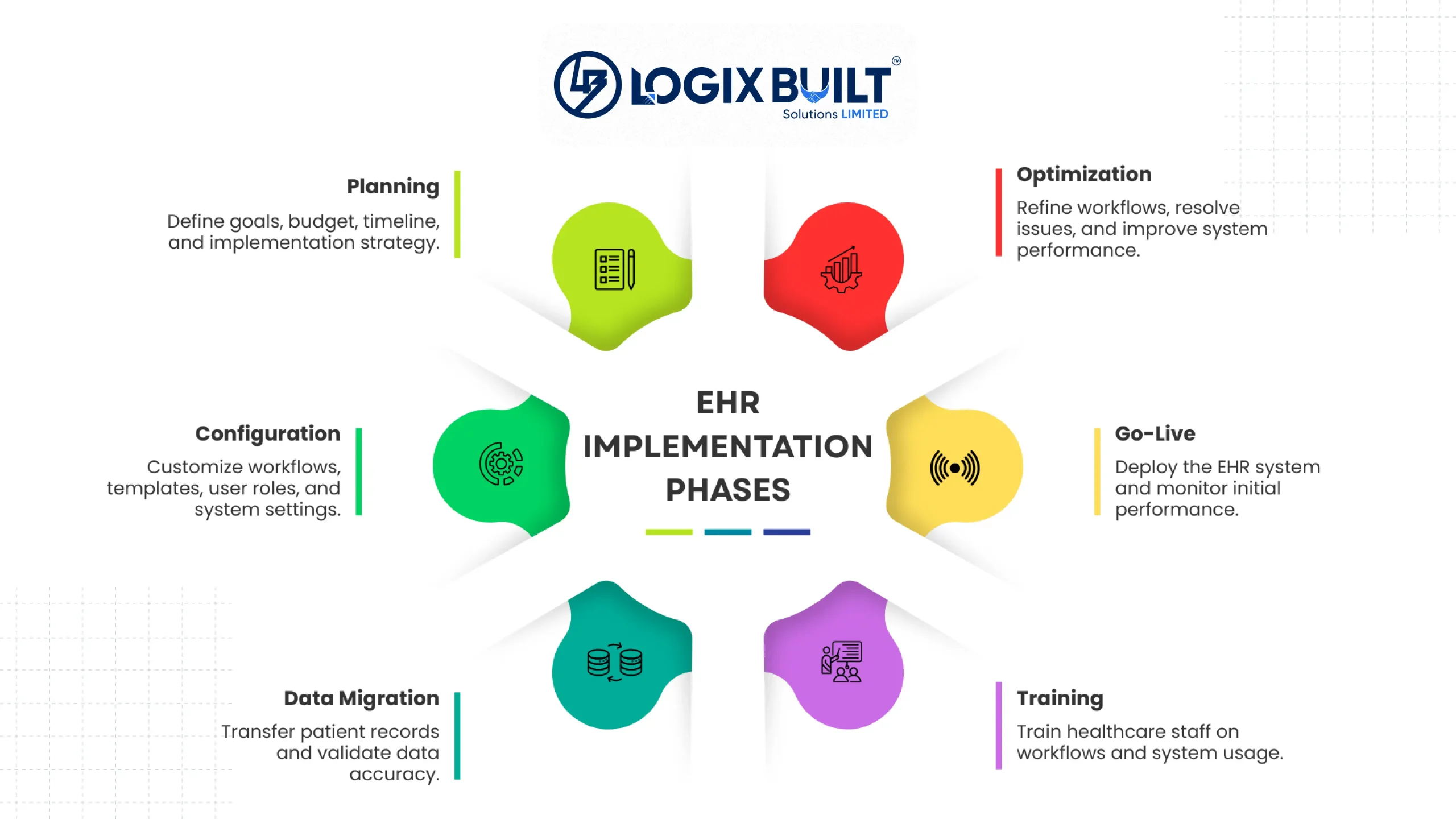
An EHR implementation is the process of setting up and maintaining an electronic health record system in a clinic. It includes four main stages: planning and vendor selection, configuration and data migration, staff training and go‑live, and post‑launch optimization. Each stage involves different people.
Clinic leaders and IT teams handle vendor choice and budgets. Clinicians shape workflows and templates. Front desk and billing staff test daily tasks. The vendor team manages configuration, migration, and technical support services. If any group is left out, problems often appear later. Most EHR challenges come from decisions not reviewed before moving to the next stage.
Common Challenges of EHR Implementation and How to Overcome Them
Some of these EHR challenges and solutions are well-documented; others only show up once staff is working within the live system. Here’s what tends to go wrong at each stage and how to fix it.
1. Staff Resistance to Change
A recent systematic review published in Digital Health found that poor EHR usability and excessive documentation time are major contributors to physician stress and burnout. The authors concluded that these factors make workflow redesign and change management critical risks during implementation.
Clinicians and front desk staff often resist change for practical reasons. The old system feels familiar, while the new one slows them down during the learning curve, and in many cases, they were never consulted before the contract was signed. Here are two indicators:
- The staff is keeping paper notes on the side.
- Staff quietly went back to the legacy system for daily tasks.
The fix:
- Bring clinicians into vendor selection and workflow design from the start.
- Name an internal champion in each department.
- Keep a feedback channel open after going live.
Resistance is the most commonly reported EHR adoption challenge, so treat it as a planning line item rather than a surprise.
2. Data Migration Issues in EHR Implementation
During migration, problems like mismatched fields, duplicate patient records, incomplete histories, and free‑text notes that don’t fit into structured fields all appear at once. Clinics also need to decide which records to move completely, which to archive, and which to keep in the old system as read‑only.
The fix:
- Audit the data before migration.
- Clean and deduplicate records.
- Run the migration in a test environment first.
- Validate a sample of charts against the source before go-live.
- Assign one owner who signs off on migration accuracy.
Shared ownership is how bad records make it into production.
3. Data Security and Privacy Risks
Migration widens your exposure. Patient data moves between systems, more people hold access than usual, and test environments rarely carry production-grade controls. The specific risks are:
- Unencrypted transfers.
- Permissions granted too broadly.
- Audit trails that were never switched on.
The fix:
- Encrypt data at rest and in transit.
- Apply role-based access from day one.
- Log every read and edit against a patient record.
- Run a security review before the system goes live.
These EHR implementation problems often go unnoticed until unauthorized access to patient records exposes them.
4. Inadequate Staff Training
Training from vendors usually teaches how to use the software in general, but not how each role should use it. A front desk coordinator works differently from a doctor, yet both are shown the same screens. Because of this, staff often make mistakes, appointments take longer, and people start blaming the system within weeks of launch. Early indicators of poor training include:
- Data entry errors.
- Longer visits.
- Staff who decide the system itself is the problem.
The fix:
- Build role-specific training.
- Run it on a copy of the clinic’s configured system rather than a vendor demo.
- Schedule refreshers at 30 and 90 days.
- Budget for the productivity dip during the training period.
Avoid These Rollout Headaches
Staff resistance, data migration errors, security gaps – most EHR problems can be planned for ahead of time. Talk to our team before you run into them.
5. Choosing the Wrong EHR Vendor
Platforms built for large hospital systems carry modules, pricing tiers, and configuration overhead that a practice with 3 to 15 physicians will never use. Four questions surface a bad fit early:
- Who owns the data?
- What does each interface cost?
- How fast is the support response?
- What happens to customizations at the next platform version?
The fix:
- Shortlist vendors already serving your specialty and size.
- Ask for references from comparable practices.
- Weigh a configured commercial platform against a custom-built system when your workflows match no off-the-shelf option.
For clinics whose workflows don’t fit a pre-built product, Logix Built offers custom healthcare software development services. They build efficient solutions for your practice rather than generic products.
6. High Implementation and Ongoing Costs
Clinics typically budget for license or build cost, hardware, and vendor implementation fees, but miss:
- Lost productivity during migration.
- Ongoing support.
- Future customization.
Across a five-year window, running costs often exceed the first-year spend, which is why the sticker price misleads.
The fix:
- Model the total cost of ownership over five years.
- Ask every vendor to price support and customization up front.
- Compare a licensed platform against a custom build before committing.
This is one of the EHR challenges that pays off most when planned early. So, estimate the EHR implementation cost before making a decision.
7. Interoperability and Data Exchange Gaps
Labs, imaging centers, pharmacies, and referral partners all run different systems, and an EHR that can’t exchange data pushes staff back to fax machines and manual re-entry. Two standards matter here: HL7 v2 for legacy interfaces and FHIR for modern APIs.
The fix:
- List every external system the clinic exchanges data with before selecting a vendor.
- Require FHIR API support in the contract.
- Test each interface with real data during the pilot, rather than after go-live.
Most problems with EHR rollouts come from interfaces that were never properly tested before go‑live.
8. Workflow Disruption During Rollout
Productivity drops after going live, and that drop is expected. Clinics that plan for it recover faster than clinics that pretend it won’t happen.
The fix:
- Cut appointment volume for the first two weeks.
- Add float or scribe staff.
- Keep the legacy system available in read-only mode.
- Map current workflows before configuration so the system matches how the clinic already operates.
- Pilot with one department before rolling out to the whole practice.
9. Regulatory Compliance Requirements
Clinics are accountable for HIPAA Privacy and Security Rules, audit logging, breach notification timelines, and the certified EHR technology requirements tied to CMS incentive programs. Compliance often gets handled as a checklist after launch, when it’s actually a set of configuration decisions made during setup.
The fix:
- Confirm the vendor’s certification status before signing.
- Configure audit trails and access controls during setup.
- Document a breach response plan.
- Give one person ownership of compliance.
If clinics don’t fix this early, it can become one of the most expensive EHR problems because regulators impose steep fines for every mistake.
10. Technical Infrastructure Gaps
Clinics tend to underestimate what sits beneath the software: network bandwidth, device age, backup power, and reliable connectivity in every exam room. The telltale symptom is a system that tests fine in one room and stalls once the whole clinic logs in at 9 a.m.
The fix:
- Run an infrastructure assessment before choosing the platform.
- Replace devices that can’t run the client.
- Size bandwidth for peak concurrent users.
- Write downtime procedures for when connectivity fails.
If your healthcare facility has reliable connectivity and capable devices, a cloud deployment model can simplify infrastructure management while reducing the burden of maintaining on-premise servers.
11. Poor System Usability
A badly configured interface costs too many clicks per encounter, screen time that pulls attention away from the patient, and documentation that spills into the evening. The scale of this is well documented: physicians spend 49.2% of their office day using the EHR and desk work, compared with just 27% on direct clinical face time with patients.
The fix:
- Build specialty-specific templates and order sets.
- Strip out fields the clinic never uses.
- Measure clicks per encounter after go-live.
- Treat usability as configuration work that continues past launch.
12. Low Patient Engagement
An EHR only returns its full value once patients use the portal for booking, results, refill requests, and secure messaging. Adoption stays low because:
- The portal needs a separate login.
- The interface isn’t built for a phone.
- Nobody at the front desk asks the patient to register.
The fix:
- Enroll patients at check-in rather than by email.
- Send appointment and results notifications by text.
- Review portal activation rates every month.
Plan an EHR Rollout Built Around Your Workflows
Careful planning around vendor selection, data migration, and workflow design prevents most implementation failures. Logix Built helps you map out a system built around your clinic’s needs.
How Logix Built Helps Clinics Avoid EHR Implementation Failures
Successful EHR implementations begin long before the system goes live. Careful planning around vendor selection, data migration, and workflow design helps healthcare organizations avoid costly delays, minimize disruptions, and ensure a smoother rollout.
Choosing the right partner is what makes this possible. Logix Built helps healthcare organizations build secure EHR solutions through their custom healthcare software development services, designed around your existing workflows. If you’re planning an implementation or replacing a legacy system, book a discovery call to map out a system built around your clinic’s needs.
FAQs on EHR Implementation Challenges
Here are quick answers to the questions clinics ask most often before and during an EHR rollout.