Patient information often ends up scattered across appointment systems, billing platforms, EHRs, and communication tools, making it difficult for healthcare providers to maintain a complete view of every patient. Healthcare CRM development addresses this challenge by centralizing patient interactions, streamlining workflows, and improving care coordination across teams and locations.
The demand for these solutions continues to grow. The global healthcare CRM market is projected to cross $35.7 billion by 2033, as providers invest in better patient engagement and operational efficiency. This guide explains the types of healthcare CRMs, their key features, benefits, development steps, and implementation challenges.
What is a Healthcare CRM?
A healthcare CRM is software that stores a patient’s contact information, appointment history, communication records, and referral details in one place. It focuses on the non-clinical side of the patient journey. It helps healthcare organizations manage inquiries, appointment reminders, follow-ups, patient communication, and feedback, while keeping this information separate from clinical records.
Healthcare CRMs are primarily used by healthcare providers, payers, and life sciences organizations. They can be deployed as web-based platforms or as part of a healthcare CRM app development project that gives staff secure access from mobile devices. Rather than replacing clinical documentation, a healthcare CRM works alongside it to improve patient engagement and operational efficiency.
The Role of CRM in Hospitals and Clinics
A healthcare CRM is a centralized platform for managing patient relationships, streamlining communication, and improving operational efficiency across hospitals and clinics. It helps healthcare organizations improve patient relationships and streamline daily operations. By bringing patient information and communication into one place, teams can work more efficiently and deliver a better patient experience.
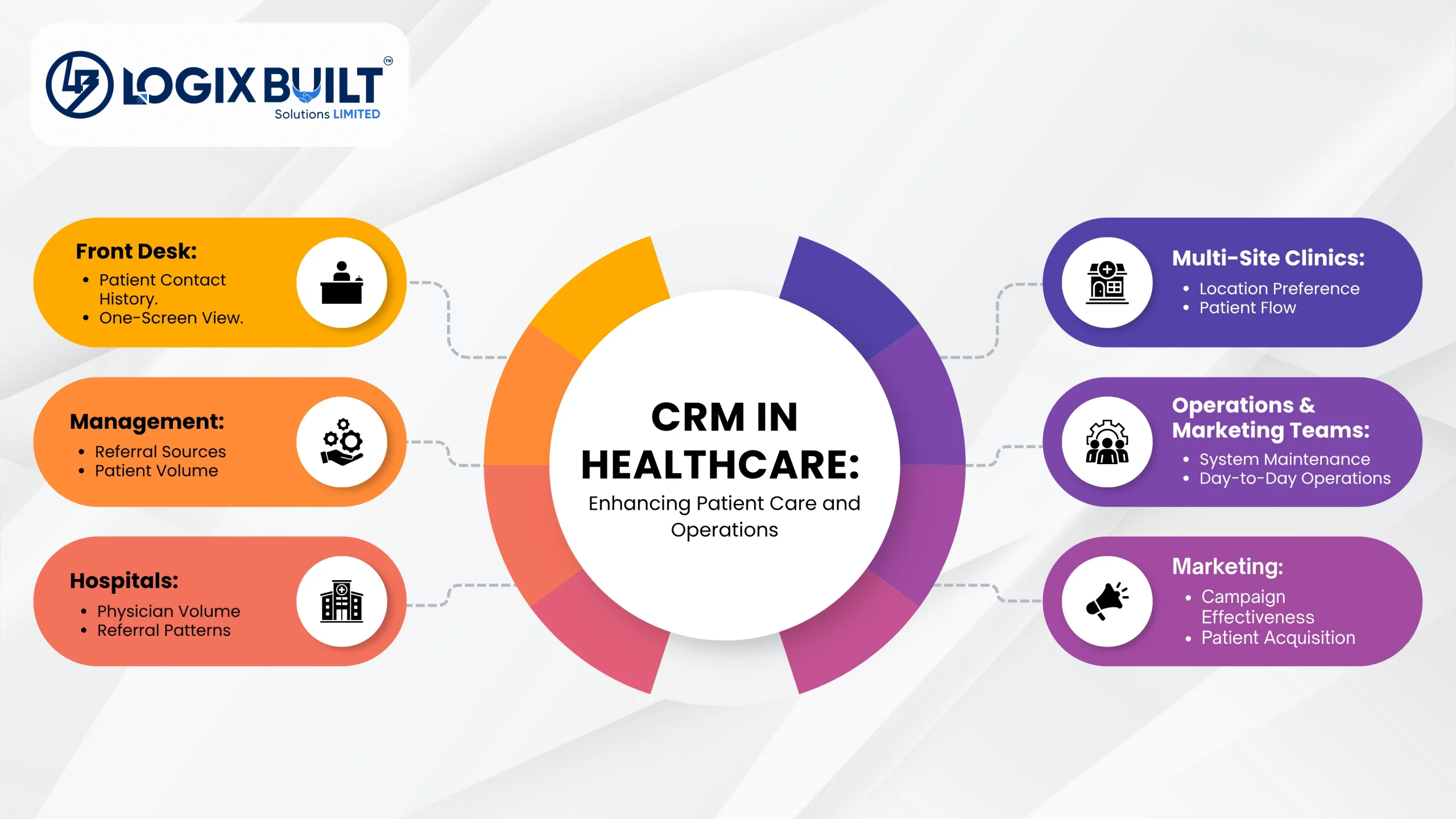
Once a CRM is in place, everyday operations become smoother. Front desk staff can view a patient’s full contact history on a single screen and manage communication with reminders and follow‑ups.
Marketing teams can track which campaigns bring patients in, while management sees which referral sources drive the most volume. For example, a multi‑site clinic can track which location each patient prefers, and a hospital can monitor referring physicians by volume.
In daily use, the system is mainly handled by operations and marketing teams, not doctors. It supports non‑clinical tasks like managing workflows and patient relationships.
Why Invest in Custom CRM Software for Healthcare?
Generic, off-the-shelf CRMs aren’t built for healthcare. They often miss features that hospitals and clinics need, such as HIPAA audit logs, easy EHR integration, and support for referral and patient care workflows. That’s why many healthcare organizations choose custom healthcare CRM development.
There are three main benefits. First, custom healthcare CRM software is built around your existing workflows, so your staff doesn’t have to change the way they work. Second, it gives you full control over where patient data is stored and how it’s managed. Third, you don’t have to pay extra licensing fees every time your team grows. That’s why custom healthcare CRM solutions are a better fit for hospitals, clinics, and healthcare networks with unique needs.
A custom CRM can also do things that standard software can’t. It can connect directly with your EHR, manage patient consent based on local regulations, and generate reports that match your organization’s goals instead of relying on generic dashboards.
Logix Built’s healthcare software development services are designed to fit each client’s workflow, not a one-size-fits-all template.
How Does Healthcare CRM Differ From EHR?
An EHR (electronic health record) stores the clinical information used to diagnose and treat patients. A healthcare CRM manages non-clinical data, such as patient communication, appointment reminders, follow-ups, and feedback. That’s the key difference.
The two systems work together. A CRM syncs relevant data from the EHR so patient communication stays accurate and up to date. Real-time integration also improves care coordination and reduces the risk of errors.
Since both systems store protected health information (PHI), they must comply with HIPAA and other healthcare data privacy regulations.
| Scope | Healthcare CRM | EHR |
| Purpose | Manages patient relationships and communication | Manages clinical treatment and documentation |
| Primary User | Front desk, marketing, and operations staff | Clinicians and care teams |
| Data Held | Contact details, appointment history, communication logs, referral data | Diagnoses, medical history, treatment history, lab results, prescriptions |
| Regulatory Scope | HIPAA | HIPAA |
Types of Healthcare CRM Software
Not every clinic needs the same kind of CRM. Here are the main types and who typically uses each.
Operational CRM
Automates everyday tasks like scheduling, intake, reminders, and follow-ups. It uses healthcare workflow automation for repetitive tasks to streamline processes such as billing follow-up and insurance-related admin work. Used mainly by front desk and operations staff, which helps reduce administrative burden and supports smoother healthcare operations.
Analytical CRM
Turns the data collected across campaigns and patient touchpoints into reports to analyze patient data, retention, referral sources, and no-show patterns. Used by management to guide decisions, with insights that can also reveal patient behavior and support choices that improve patient outcomes.
Collaborative CRM
Shares patient interaction history across departments and locations. This way, care teams and admin staff can work from the same record. Shared communication channels improve coordination among healthcare teams. It is especially valuable in larger healthcare systems.
Customer Service CRM
Handles patient questions, complaints, and support requests by phone, email, and chat. Call center teams use it most. It also helps hospital staff resolve issues faster.
Marketing CRM
Runs patient outreach campaigns, tracks responses, and segments audiences by condition, location, or visit history. With marketing automation, healthcare organizations can then personalize campaigns for different patient groups.
Patient Relationship Management CRM
Covers the full patient journey, from first inquiry to long‑term retention. It brings engagement, feedback, and loyalty tracking together in one place. The system also supports personalized communication based on patient preferences. Over time, this improves both experience and satisfaction.
Benefits of CRM in Healthcare
A healthcare CRM isn’t just a data storage tool. It changes how a clinic or hospital operates every day, shaping patient communication, streamlining workflows, and improving staff coordination.
Better Patient Engagement and Retention
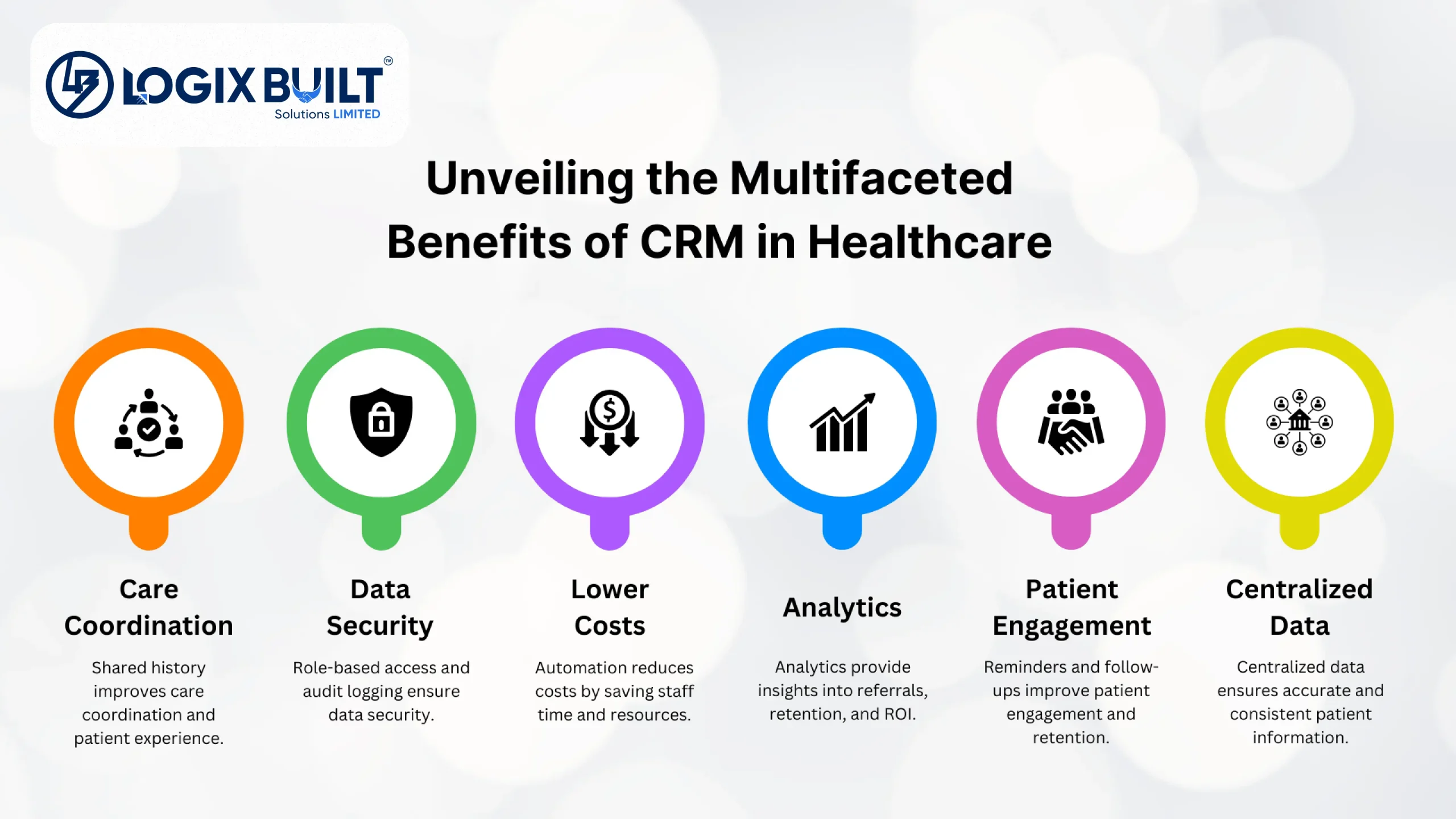
Automated appointment reminders and follow-ups keep patients coming back for care. Effective CRM integration can reduce missed follow-ups, reinforcing retention and continuity of care. They also cut down on missed appointments, which cost the practice real revenue.
Centralized Patient Data Management
Centralized patient data management improves accuracy and access by giving staff one shared patient record. This prevents duplicate data entry and stops teams from working with conflicting contact details or outdated notes. With healthcare organizations generating massive amounts of data daily, a single source of truth becomes essential.
Lower Administrative Cost and Staff Workload
Automating intake, reminders, and follow-up frees up front desk hours while lowering administrative burden. It also reduces the need to add headcount as patient volume grows, and cutting manual work helps streamline healthcare operations.
Stronger Analytics For Decision-Making
CRM reporting shows which referral sources, retention efforts, and campaigns drive results, helping management decide where to spend the next marketing dollar. Stronger analytics also guide outreach and service decisions, supporting better patient outcomes.
Improved Care Coordination Across Teams
A shared interaction history means patients don’t have to repeat the same story to every department or location. This improves coordination and ensures all providers act on the same up‑to‑date information for better care.
Tighter Data Security and Regulatory Compliance
Role-based access controls who can view patient records. Audit logging proves who viewed a record and when. Secure data storage supports this compliance foundation.
Want These Benefits for Your Clinic?
Better patient retention, lower admin workload, stronger analytics – see what a CRM built around your workflow could actually look like for your team.
Healthcare CRM Features That Matter Most
Not every feature adds equal value. Below are the ones that truly matter when building a healthcare CRM, each solving a specific problem for clinics and hospitals.
Unified Patient Profiles
A single record holds contact details, visit history, communication logs, insurance status, referral source, and relevant medical history. It is used mainly for non‑clinical outreach. This eliminates scattered files and gives staff one clear view of the patient relationship.
Appointment Scheduling and Reminders
Patients can book appointments online, receive automated confirmations, and get reminders via SMS, email, or WhatsApp. Rescheduling happens without phone calls, reducing missed appointments and saving staff time.
Omnichannel Patient Communication
Every message, SMS, email, phone, or chat sent across communication channels is logged against the same patient record. This makes personalized communication easier for staff handling follow-up and support, so context is never lost, and patients don’t need to repeat themselves.
Marketing and Campaign Automation
Segment patients by condition, location, or last visit to support marketing automation in campaign execution. Run targeted outreach campaigns and track response rates, helping clinics engage patients more effectively and support existing patients with relevant follow-up outreach.
Task Management For Care Teams
Assign follow‑ups, referrals, and callbacks to specific staff across healthcare teams with due dates, which helps keep treatment plans coordinated. Automatic escalation prevents tasks from slipping through the cracks.
Analytics And Reporting Dashboards
Live dashboards show no‑show rates, referral volume, patient acquisition cost, and retention by location. They can also be used to analyze patient data. This helps track patient satisfaction trends and highlight areas for improvement.
Integration with EHR, HIS, and Billing Systems
Two‑way sync ensures clinical and financial data flows into the CRM without duplicate entry, with strong integration capabilities across connected tools. HL7 and FHIR standards make integration reliable. By syncing with healthcare systems and EHRs, organizations can coordinate data better, while real‑time alignment helps improve patient outcomes.
Role‑Based Access Control
Permissions are set by role, including front desk, clinicians, marketing, or administrators. RBAC protects sensitive patient data, prevents unauthorized access, and ensures compliance with healthcare security requirements.
AI-Powered Patient Engagement
AI helps healthcare organizations engage patients more effectively by analyzing communication patterns and patient behavior. It can recommend personalized follow-ups, automate routine messages, and identify patients who may need re-engagement. This improves patient communication, reduces administrative effort, and supports better patient retention.
Healthcare CRM Software Development Process
Building a healthcare CRM follows a clear set of steps. Here is what happens at each stage, and what you get at the end of it.
Define Requirements
The team maps current workflows and lists every system the CRM must connect to. They also agree on success in real numbers, with requirements that define how the CRM will support patient care, staff workflows, and reporting goals.
Conduct Research
The team studies how staff work today, reviews the compliance rules that apply, and checks what data already exists and in what condition.
Hire a Technical Partner
Choosing the right technical partner is one of the most important steps in building a healthcare CRM. You need a team with proven expertise in custom CRM systems, especially for medical workflows. An experienced partner saves time, reduces costly mistakes, and ensures smooth integration with EHRs. Logix Built aligns with these criteria with its custom CRM development services, delivering healthcare CRM solutions from requirements to launch.
UI/UX Design and Prototyping
The team builds clickable prototypes of the screens staff will use most. These get tested with real front desk and admin users before a single line of code is written.
Development, Integrations, and Testing
The team builds the core modules, connects the EHR and billing systems, and tests the whole system for function, load, and security.
Deployment
The team migrates existing patient data, runs the new system alongside the old one for a transition period, and trains staff before making the full switch.
Post-Development Monitoring
The team tracks adoption, uptime, and support tickets after launch. Whatever staff actually struggle with in the first 90 days gets fixed quickly.
Build a Healthcare CRM Tailored to Your Clinic
Logix Built develops custom CRMs, EHR integrations, and billing automation tailored to your workflows, operational goals, and patient care requirements.
Challenges in Healthcare CRM Software Development
Most healthcare CRM projects run into a few common obstacles. Here are some common challenges and ways to overcome them.
HIPAA and Regulatory Compliance
Any system that touches patient data has to handle consent, audit trails, and breach notification correctly. If you serve European patients, GDPR applies too.
Patient Data Security
Encryption protects patient data at rest and in transit. Role‑based access limits viewing. Routine risk assessments confirm safeguards. A phishing attack showed the danger when 189,763 records were exposed, and a $600,000 HIPAA settlement followed.
EHR and Legacy System Integration
Many hospital systems were never built with modern APIs in mind, which is why integration timelines almost always run longer than planned. Build that buffer into the project schedule from the start, not after delays surface.
Data Quality and Migration
A new CRM inherits every duplicate and incomplete record from the old system unless someone fixes that first. Clean and de-duplicate the data before migration, since patching it afterward costs far more time.
Lower Staff Adoption
Staff quietly stop using a CRM the moment it fights their existing workflow instead of fitting into it. Bring front desk teams into the design process early, not as an afterthought once the system is built.
These challenges are not reasons to avoid building a healthcare CRM. They are reasons to build it with the right partner from the very beginning.
Build a Healthcare CRM With Logix Built
A healthcare CRM brings all patient information into one trusted system. Success depends on choosing the right features for how your organization runs, while compliance and integration decide whether the build moves forward or stalls.
At Logix Built, we provide healthcare software development services that help organizations build secure, scalable, and compliant digital solutions. From custom healthcare CRMs and EHR integrations to billing automation and patient engagement platforms, we develop software tailored to your workflows, operational goals, and patient care requirements. If you’re planning to build or modernize a healthcare CRM, contact our team to discuss your requirements!
FAQs on Healthcare CRM Development
Here are quick answers to the questions that clinics and hospitals most often ask before starting a CRM project.